Skip to contentNew: the AI Shopping Visibility Index
AEOsome

Changelog

Everything we have shipped in AEOsome, newest first. Pick an area to see only what changed there.

Last release Oct 11, 2026. Guides for each feature are in the help center, and longer write-ups on the blog. New here? Run the free scan.

Show changes in

64 changes in 22 releases

Latest release

See whether AI agents can find, buy from and trust your store

The readiness check used to stop at each product page. Now Overview also says whether ChatGPT can find your store, whether Google's agents can check out on it and whether they can read your return policy, the product checklist matches what ChatGPT's feed asks for, and AEOsome builds that feed for you.

  • New

    Know when your store gets harder for AI agents to read

    Each store check now counts your ready products, and the Ready for AI shopping card says how that compares with the last check. If the checkout profile stops answering, robots.txt newly blocks an AI search crawler or the ready count falls by 10% or more, a finding opens on Overview. Paid plans also get an alert.

    Dashboard · Readiness over time

  • New

    Do ready products get named more?

    Once you track at least 5 products the feed accepts and 5 it leaves out, Overview compares how often AI answers named each group over the last 30 days. A small sample is labelled as a hint, not proof.

    Dashboard

  • Improved

    llms.txt is optional

    No major AI engine reads llms.txt yet, so a missing or invalid file is now a low-priority item rather than a recommended fix.

    Fixes and checks

  • New

    Product feed on Overview

    See how many variant rows are ready, preview them, and see which products are left out and why. Paid plans download the ChatGPT and Google files; Growth and above get a hosted URL Merchant Center can fetch on a schedule.

    Dashboard · How the feed is built

  • New

    Feed pack

    Keep your plan and add a hosted feed URL: $9 a month hosts up to 1,000 products, $19 up to 5,000. Buy it from the Product feed card on Overview.

    Plans and billing · Feed pack

  • Improved

    Brand and condition fixes on every plan

    When a product has no brand, the fix suggests your store's name, and a missing condition is set to new. These values come from a rule rather than generated text, so Free shows them in full.

    Fixes and checks

  • New

    A free AI shopping scan for any store

    Enter a Shopify or WooCommerce store on the AI shopping readiness page and see the same three rows, a readiness score from up to 20 of its products and the most common gaps, with no account. The per-product report is emailed to an address at that store.

    Website and help

  • New

    Ready for AI shopping on Overview

    Three rows, each with one next step: found by ChatGPT, buyable in Google AI Mode and trusted by agents. AEOsome checks your store's checkout profile, robots.txt and policy pages on the same schedule as your page audits.

    Dashboard · What the store checks read

  • Improved

    Readiness covers your whole catalog

    Every product in your store is checked for AI shopping, up to 1,000 on Free and 5,000 on paid plans, not only the ones you track. Tracking, which asks the AI engines about a product, still counts against your plan's product limit.

    Dashboard · Read a product's checklist

  • Improved

    Feed errors caught before ChatGPT refuses them

    A barcode with the wrong length or check digit, a compare-at price below the selling price and SVG, AVIF or HEIC images are now flagged, because shopping feeds reject a product with any of them.

    Fixes and checks · Read a product's checklist

  • Improved

    Brand is a required field

    ChatGPT needs a brand on every product, so a product without one is marked not ready. Titles over 150 characters and descriptions over 5,000 are flagged too, because the feed refuses them.

    Fixes and checks · Read a product's checklist

  • Improved

    Blocked crawlers ranked by what they cost you

    Blocking OAI-SearchBot, PerplexityBot or Bingbot keeps you out of answers and stays urgent. Blocking GPTBot or another training crawler only keeps you out of future models, so it drops to low. Rules written for one crawler now apply to that crawler alone, so blocking one bot no longer reads as blocking them all.

    Fixes and checks · See the store checks

  • Fixed

    Return policies inside the offer are found

    Themes such as Dawn put the return policy and shipping inside the product's offer. The audit now reads them there, along with GTIN-8, GTIN-14 and MPN, instead of reporting them missing.

    Fixes and checks
Ask your AI assistant how your store is doing

Your visibility data used to live only in the dashboard. Now you can ask for it in the AI assistant or terminal you already work in: which products ChatGPT left out this month, and what to fix first.

  • New

    Your store data inside your AI assistant

    Add AEOsome as an MCP server and your assistant can read your products, the questions shoppers ask, where you were named and the fixes waiting for you. Ask in plain words; it answers from your real numbers.

    API and AI agents · Connect over MCP

  • New

    A command line for your store

    The aeosome command prints your dashboard, the questions where a rival was named instead of you, and your fixes. Add --json and it feeds a script or a weekly report.

    API and AI agents · Install the CLI

  • New

    API keys on paid plans

    Create and revoke keys in Settings, Integrations. A key reads your data and changes nothing, so it is safe to hand to an assistant.

    API and AI agents · Create a key

  • Fixed

    One alert per problem

    A problem found on every scan stays one finding instead of adding a copy each run, and whether an answer named your brand is decided by one rule everywhere.

    Dashboard

A guide for every screen, and one number per metric

Every screen in the app now has a help page, and a product's score reads the same on Overview, Products and its own page.

  • New

    Help center

    docs.aeosome.com walks through connecting a store, adding products, reading your visibility and shipping fixes, one page per screen.

    Website and help · Open the help center

  • Improved

    Urgent fixes come first

    Ship next leads with the fixes marked urgent, so the first thing you open each week is the one that cannot wait.

    Fixes and checks · Working through fixes

  • Fixed

    Every page's numbers agree

    Overview, Products and a product's own page compute each metric the same way, so one product never shows two scores.

    Dashboard

Every store AI shoppers cite gets a public page

See how any brand in the AI Shopping Index does at each shopping stage and on each engine, then unlock the same report for your own store.

  • New

    One page per brand

    Each store that AI assistants cite at least five times gets a page with its findings, its average position and how it does at every shopping stage and on every engine.

    AI Shopping Index

  • New

    Unlock the full report

    Check my store asks for your website and an email at that domain, so a store's report only goes to the people who run it.

    AI Shopping Index

  • New

    How we measure, in public

    The methodology page lists the questions asked, what counts as a citation and how visibility is computed. A small sample carries a badge, so you know how much weight a number can take.

    AI Shopping Index

  • Improved

    Every number has its period

    Each figure on the dashboard says the period it covers, such as last 7 days or this month, so a jump is never a change of window.

    Dashboard

WooCommerce stores, connected

AEOsome was Shopify only. Now a WooCommerce store connects in a minute and is tracked like any other.

  • New

    Connect a WooCommerce store

    Add your store's address, approve the connection in WooCommerce, and your products import in the background while you watch the progress.

    Store connections · Connect a store

  • Improved

    Clear reconnect when access is revoked

    If a store's access key is revoked, the integration card says so and offers to reconnect, and a failed first import tells you what went wrong.

    Store connections

Turn on an engine, see its answers the same day

Adding an engine used to mean waiting for the next scheduled scan. Now its questions run straight away, and a failed question can be retried on the spot.

  • Improved

    Answers the day you turn an engine on

    Enabling an engine in Settings queues its questions at once instead of waiting for the next scheduled scan.

    Dashboard

  • New

    Retry failed questions

    When questions in your first scan fail, the progress banner offers to retry just those, and a finished scan says whether it completed or failed.

    Dashboard

  • Improved

    Only engines that show products

    AEOsome tracks ChatGPT and Google AI Mode, the engines whose answers carry product cards. Engines whose answers never showed product data are gone, so no column on your dashboard is a zero that means nothing.

    Dashboard

Pick a plan once, and it follows you

The plan you choose on the pricing page carries through sign up and checkout, and Settings shows where you stand.

  • New

    Your plan from sign up to checkout

    Choose a plan on the pricing page and it follows you through sign up, checkout and back to the app, with a billing card in Settings that shows where you stand.

    Plans and billing

See which stores AI shopping assistants recommend

A public, monthly measure of the stores AI assistants name when shoppers ask what to buy, by category, and a free check that shows where yours stands.

  • New

    AI Shopping Visibility Index

    See which online stores AI shopping assistants name when shoppers ask what to buy, by category, measured every month.

    AI Shopping Index

  • New

    Check your store for free

    Enter your store's website and we email you its AI shopping visibility report: where assistants name it and who they name instead.

    AI Shopping Index

  • New

    Your first scan, summed up

    On every plan, the overview opens with what your first scan asked, where you were named and where you were not.

    Dashboard

  • New

    Public pricing and a Free plan

    Plans and prices are on aeosome.com/pricing, and the Free plan shows what each upgrade adds and what it costs.

    Plans and billing

Ship a fix, then see whether it worked

Until now a fix was a guess. Verify asks the same shopper questions again after you ship and shows whether your product moved, plus a readiness check for AI shopping and the revenue AI shoppers send you.

  • New

    Measured lift after a fix

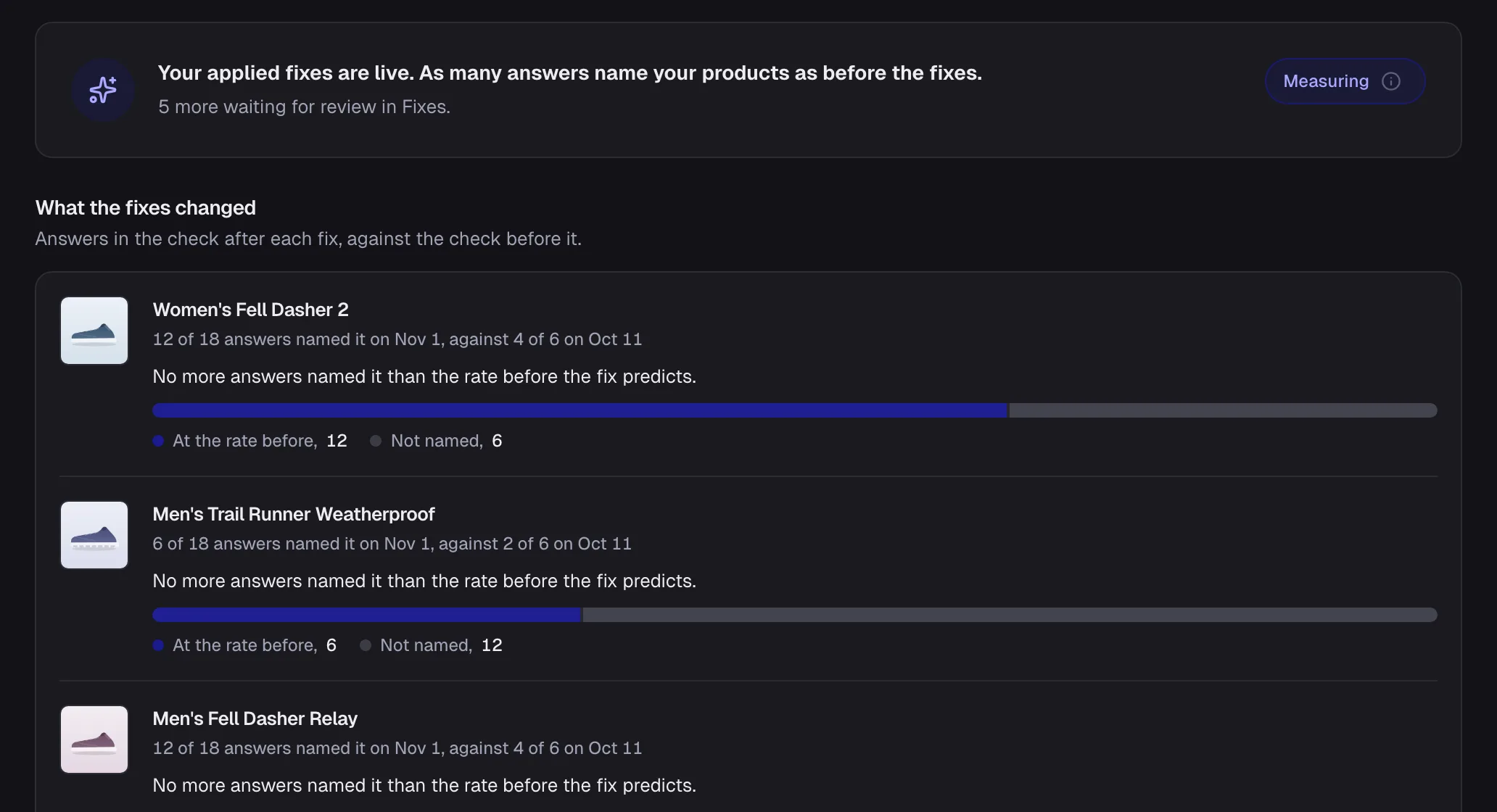
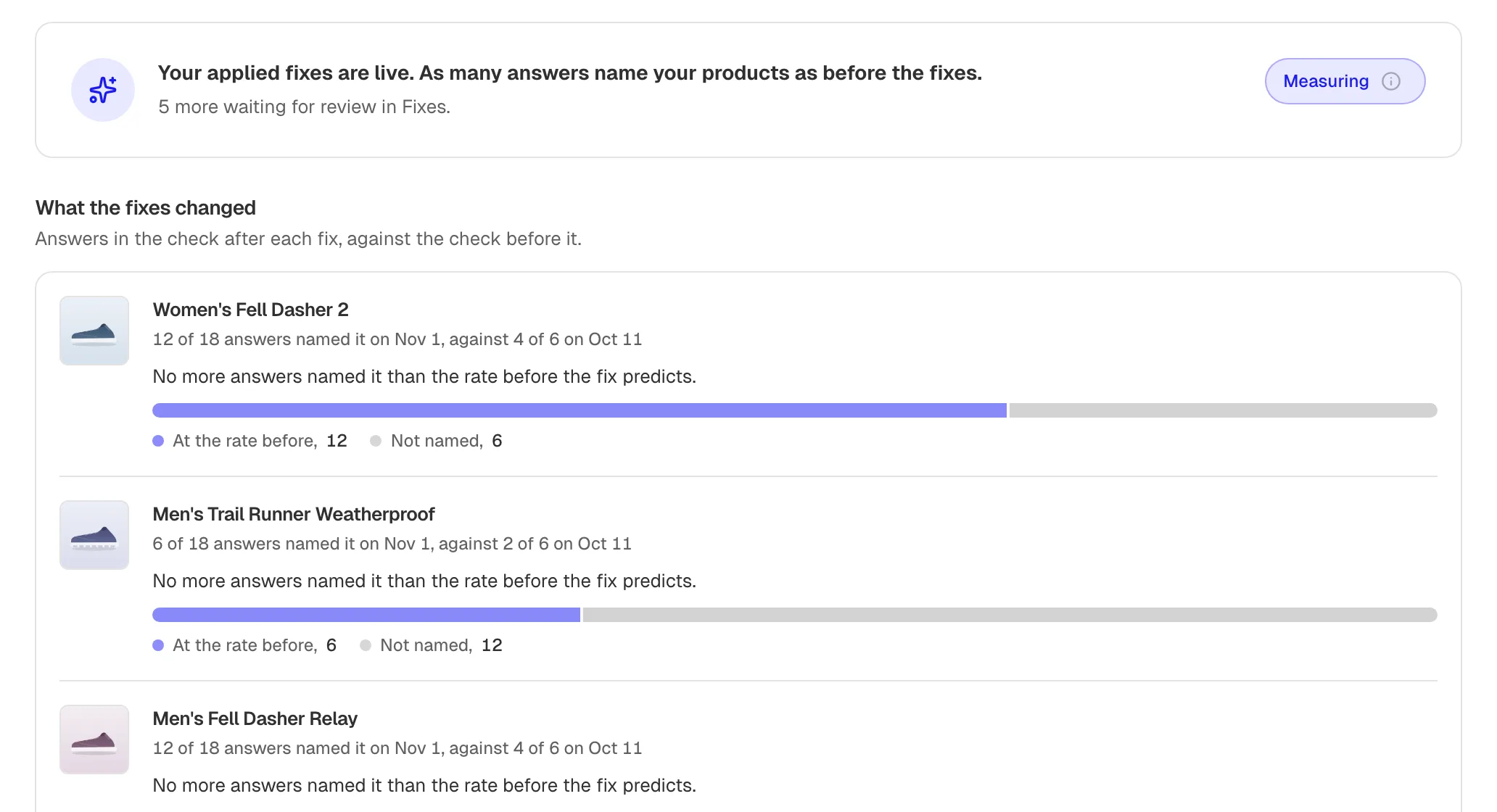
    After you ship a fix, Verify asks the same questions again and shows whether your product's visibility changed.

    The Verify screen: products re-checked after a fix, before and after

    Fixes and checks · How Verify works

  • New

    AI shopping readiness

    Each product gets a readiness score and a checklist of the fields an AI shopping agent reads before it lists or buys a product: ID, price, availability, images, variants and more.

    Fixes and checks

Read exactly what the AI said about you

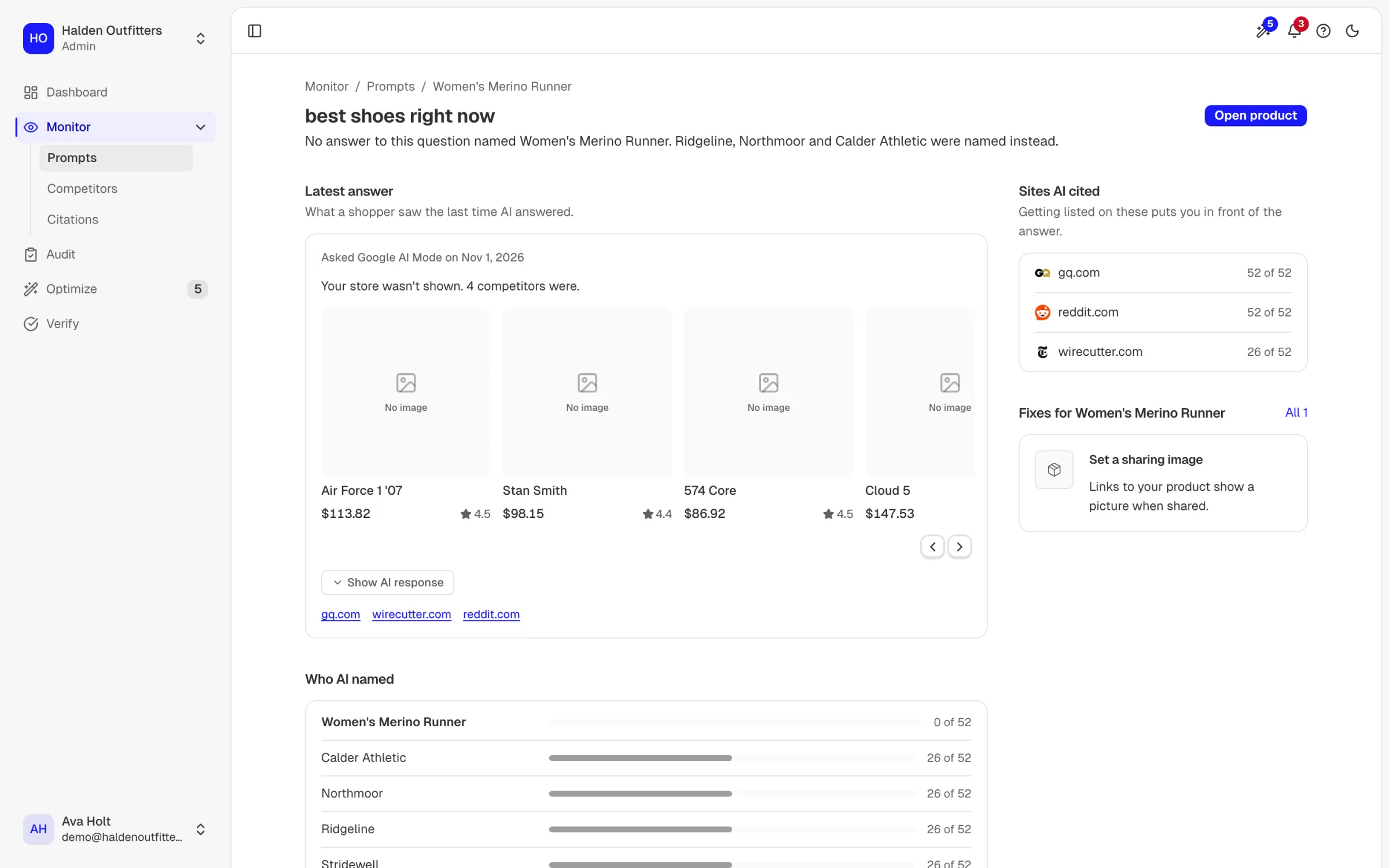
A captured answer reads like the assistant wrote it, with every brand it named highlighted, so you see at a glance who got picked instead of you.

  • Improved

    Answers you can read

    A captured AI answer renders as readable text with every brand in it marked, so you can see at a glance who was named.

    One shopper question: which brands AI named instead of the store's product, each answer it gave, and the sites it cited

    Dashboard

Fixes that write themselves to Shopify

Finding a gap used to end with a to-do. Now one click writes the fix to your Shopify product, and a re-check confirms it is live.

  • New

    Apply a fix to your Shopify store

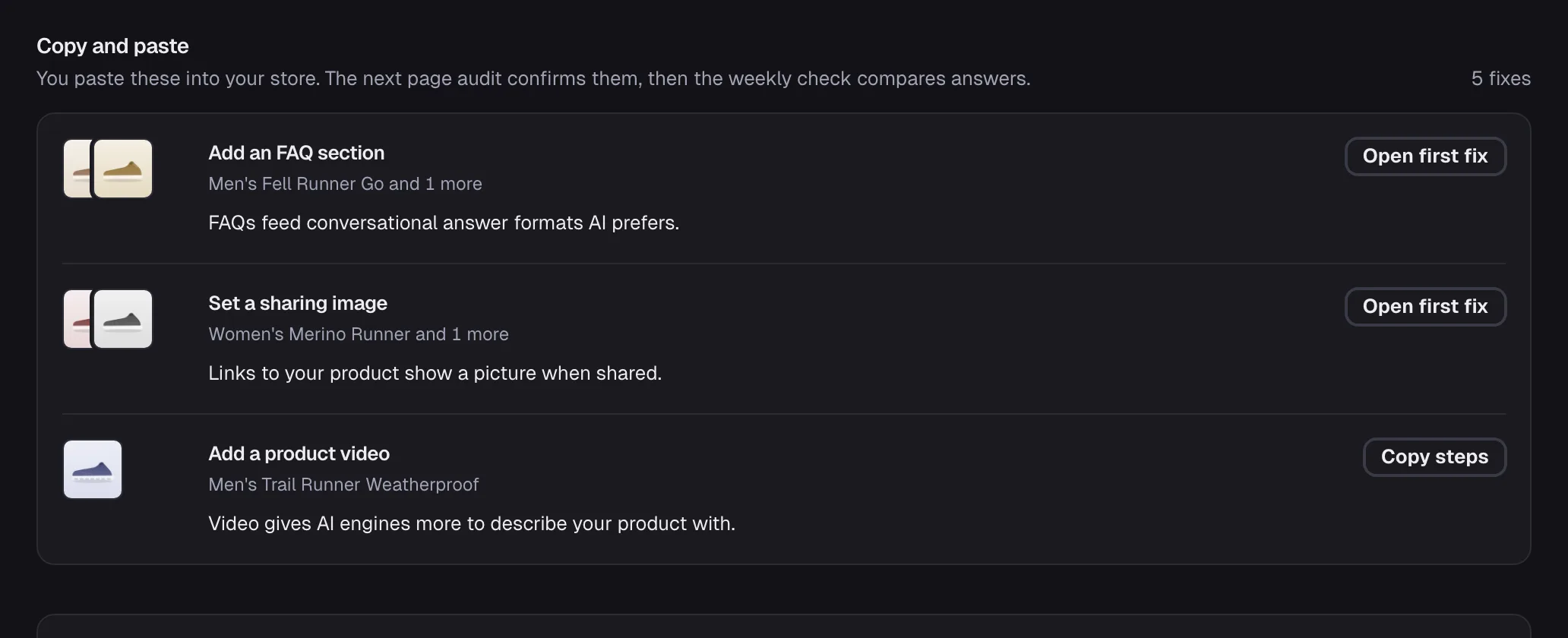
    A fix can be written straight to your Shopify product, with a guide for the ones you make by hand, and a re-check once it is live.

    The Optimize screen: fixes grouped by how they are applied, each with the evidence for it

    Fixes and checks

  • Improved

    Only real rivals

    A site that only writes about products, such as a review blog, no longer counts as a rival store, so your competitor list is stores you actually lose sales to.

    Dashboard

  • New

    One account across Shopify and the web

    Installing from Shopify and signing in on the web reach the same account, and Shopify merchants can pay through Shopify billing.

    Store connections

Your store data, locked to your account

A round of hardening so your data is only ever read by your team, and scans that keep their schedule.

  • Improved

    Security hardening

    Every request for store data is checked against your organization, store addresses are validated before we fetch them, and logs no longer keep sensitive values.

    Trust and reliability

  • Improved

    Scans that keep their schedule

    Scheduled scans pick up the products that are due, a store sync that cannot succeed backs off instead of retrying forever, and quota comes back for questions that never ran.

    Trust and reliability

Find out whether AI crawlers can even read your store

A store can rank on Google and still be invisible to AI assistants because robots.txt shuts their crawlers out. Page checks now catch that, alongside a weekly digest, exports and a ready-made llms.txt.

  • New

    Weekly digest

    A weekly email sums up how your products did in AI answers and what changed.

    Dashboard

  • New

    llms.txt generator

    AEOsome writes the llms.txt file for your store that tells AI assistants what your site offers, ready to publish.

    Fixes and checks

  • New

    AI crawler check

    Page checks test whether the crawlers behind ChatGPT and Google's AI answers are allowed to read your product pages, and name the one that is blocked.

    Fixes and checks

  • New

    Export to CSV, analytics by engine

    Export your shopper questions and their results, and narrow share of voice and the shopping journey to a single engine.

    Dashboard

Guided tours

A first look around the dashboard, whenever you want one.

  • New

    Take a tour

    A guided tour points out each part of the dashboard. Start it again any time from your account menu.

    Dashboard

Questions that sound like shoppers

The questions AEOsome asks on your behalf now read like real shoppers, and you can add your own.

  • Improved

    Natural shopper questions

    Questions generated from your catalog are phrased the way people actually ask an assistant what to buy.

    Dashboard

  • New

    Add and remove your own questions

    Add a question you know your shoppers ask to any product, and delete the ones that do not fit.

    Dashboard

  • Improved

    Metrics on audit pages

    Audit pages show the numbers behind each finding, so you can see why a page was flagged.

    Fixes and checks

  • Improved

    A refreshed brand

    A new logo, colours and theme across the site and the app.

    Website and help

Free beta with visible usage

Everyone joins on one free beta plan, with usage shown in the app so you always know what is left.

  • New

    Free beta plan and usage meter

    Every account starts on the free beta plan, and the app shows how much of its quota you have used.

    Plans and billing

  • Improved

    Better questions

    The question generator was tuned to ask more varied, more relevant questions about each product.

    Dashboard

Product monitoring and smoother onboarding

Watch each product's answers over time, and get set up in one guided flow.

  • New

    Product monitor

    Each product has its own monitor showing the answers it appears in and how that changes over time. The dashboard refreshes itself while a scan runs.

    Dashboard

  • Improved

    Onboarding in one flow

    Setup is one guided sequence, including a step to invite your team.

    Dashboard

  • Improved

    Shopify variants

    Product variants such as sizes and colours sync from Shopify with the product.

    Store connections

Questions generated from your catalog

AEOsome writes the shopper questions for each product itself, and the dashboard got a full redesign.

  • New

    Generated shopper questions

    For each product, AEOsome writes the questions a shopper might ask an AI assistant, from the product's own details.

    Dashboard

  • Improved

    Dashboard redesign

    A redesigned dashboard built on cleaner data, so each page shows what was measured for your products.

    Dashboard

A new website

aeosome.com was redesigned, with dark mode, a responsive layout and faster loading.

  • New

    New aeosome.com

    A new landing page that shows what AEOsome does, with dark mode and a layout that works on any screen.

    Website and help

Product cards and competitor tracking

See the product cards AI assistants show shoppers, and who appears next to you.

  • New

    Product cards in answers

    When an assistant answers with shopping cards, AEOsome captures them and shows which products it picked.

    Dashboard

  • New

    Competitors and positions

    Track the competitors named alongside you and an overview of the position you appear in.

    Dashboard

Connect your Shopify store

Bring your catalog in from Shopify instead of adding products by hand.

  • New

    Shopify connection

    Connect a Shopify store and AEOsome imports its products, ready to track.

    Store connections

Where it started

The first version of AEOsome: ask AI assistants about your products and see what they say.

  • New

    The first dashboard

    Questions about your products asked on a schedule, the answers and citations that came back, your position in them and recommendations to improve it.

    Dashboard

  • New

    Product page audits

    An audit of each product page lists what keeps it out of AI answers, including readiness for agentic checkout.

    Fixes and checks