Making Shopify SKUs Checkout-Ready for AI Shopping Agents
A product being visible to an AI shopping agent doesn't mean it can be bought. The 6-step guide to making Shopify SKUs checkout-ready before a purchase completes.

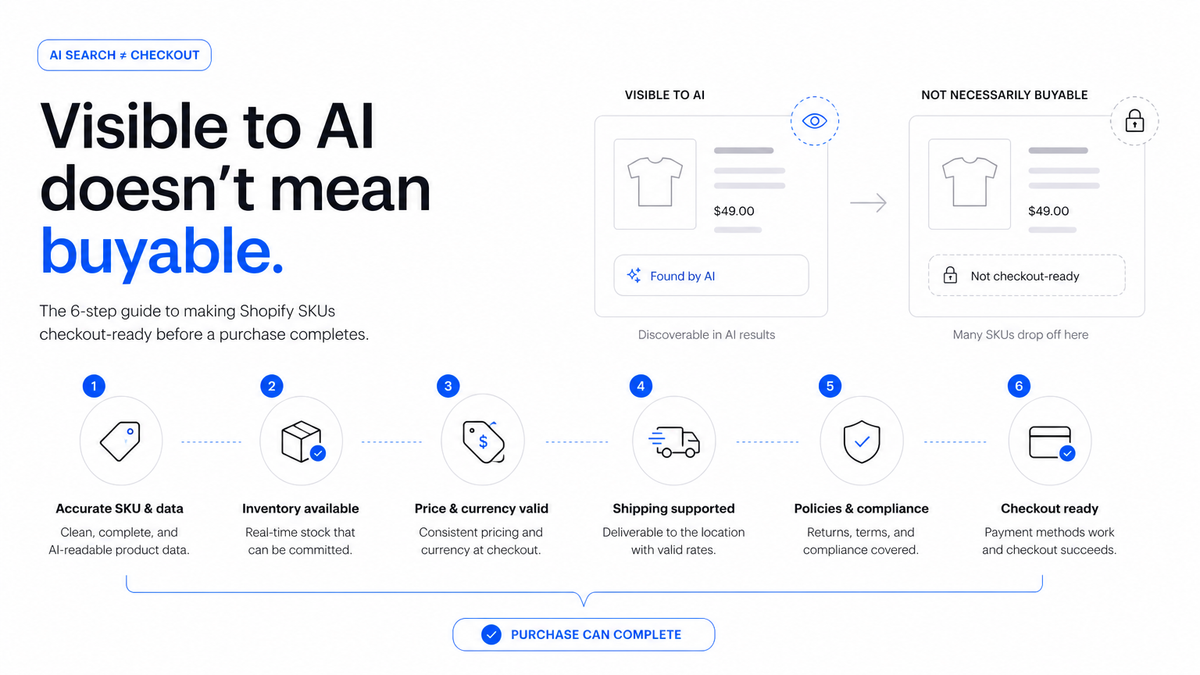
Making a Shopify SKU checkout-ready for an AI shopping agent means its live price, inventory, tax, shipping, and fulfillment data all match reality. That has to hold true at the moment the agent's checkout session runs, not when the feed last synced. Feed eligibility gets a SKU discovered. Real-time data accuracy is what lets the purchase actually complete.
Key Takeawaysis_eligible_checkoutdefaults to false and only activates onceis_eligible_searchis true. Passing that flag check isn't the same as a checkout surviving contact with your live store (OpenAI Agentic Commerce Protocol feed spec, 2026).ACP checkout runs as a live session: create, update for shipping or variant changes, get state, complete, cancel. OpenAI directs merchants to treat their own system, not the feed, as the source of truth for price, inventory, tax, and order state (OpenAI Agentic Commerce Protocol documentation, 2026).Shopify Catalog verifies pricing and inventory in real time and syndicates that data to every connected AI platform automatically (Shopify, June 2026).AI-driven traffic to Shopify stores grew 8 times year over year, and orders from AI-powered searches grew nearly 13 times, in Q1 2026. New buyers purchase through AI channels at nearly twice the rate of other channels (Shopify, June 2026).Payment is delegated to a processor like Stripe or PayPal, while the merchant stays merchant of record throughout. Stripe shipped its Agentic Commerce Suite on December 11, 2025; PayPal joined as a payment provider on October 28, 2025 (Stripe Newsroom; PayPal Newsroom, 2025). A checkout failure is still your support ticket, not the agent's.
A shopper's AI agent adds a product to cart and confirms the order. The checkout session fails anyway, even though the product was fully visible and eligible minutes earlier. That gap trips up merchants who chase feed eligibility and stop there, assuming visible means purchasable. It doesn't.
This guide covers 6 things to verify, SKU by SKU, before you trust checkout eligibility in production. It also covers how to simulate a failed purchase before a shopper does it for you. For the redirect-versus-native distinction behind the Buy button itself, see what changed with ChatGPT Instant Checkout for Shopify.
In this article:
- What "Checkout-Ready" Actually Means for a Shopify SKU {: #what-checkout-ready-actually-means-for-a-shopify-sku }
- Step 1: Confirm the SKU Is Search-Eligible Before Checkout Matters {: #step-1-confirm-the-sku-is-search-eligible-before-checkout-matters }
- Step 2: Keep Variant-Level Inventory Accurate in Real Time {: #step-2-keep-variant-level-inventory-accurate-in-real-time }
- Step 3: Make Price, Tax, and Shipping Totals Match at the Moment of Checkout {: #step-3-make-price-tax-and-shipping-totals-match-at-the-moment-of-checkout }
- Step 4: Confirm Fulfillment Capability for Every SKU and Destination {: #step-4-confirm-fulfillment-capability-for-every-sku-and-destination }
- Step 5: Verify Payment Delegation and Merchant-of-Record Settings {: #step-5-verify-payment-delegation-and-merchant-of-record-settings }
- Step 6: Simulate a Checkout Before You Trust It in Production {: #step-6-simulate-a-checkout-before-you-trust-it-in-production }
- Frequently Asked Questions {: #frequently-asked-questions }
- Visible Isn't Purchasable. Test the Checkout, Not Just the Feed. {: #visible-isnt-purchasable-test-the-checkout-not-just-the-feed }
What "Checkout-Ready" Actually Means for a Shopify SKU
Checkout-ready means a SKU's live data matches what an AI agent's checkout session verifies at the moment of purchase. That's not the same as what the feed said at its last sync. Those are two different systems with two different failure points.
The product feed is batch data. It syncs on a schedule, platform-dependent, and sets eligibility flags like is_eligible_checkout based on whatever your catalog looked like at that last sync. The checkout session is live. It runs through live API calls: create, update, get state, complete, cancel. Each one re-checks price, inventory, tax, and shipping against your actual store, not your feed snapshot.
Citation Capsule: OpenAI's ACP documentation directs merchants to treat their own system as the source of truth for price, inventory, tax, and order state at checkout. That's not the data last pushed to the feed (OpenAI Agentic Commerce Protocol documentation, 2026).
A SKU can clear every feed check and still fail at checkout if real-time stock, price, or fulfillment data has drifted since the last sync. That's the gap this guide closes. Confirm search eligibility first before chasing checkout fixes with the product feed eligibility checklist.
Step 1: Confirm the SKU Is Search-Eligible Before Checkout Matters
Checkout readiness only matters once a SKU has already cleared is_eligible_search. Fixing checkout-session issues on a SKU that isn't discoverable yet wastes effort; an agent can't check out a product it can't find.
That dependency runs one direction. is_eligible_checkout defaults to false and only activates after search eligibility passes (OpenAI Agentic Commerce Protocol feed spec, 2026). If a SKU still fails search eligibility, the schema and GTIN work behind it needs attention first. See the product schema and GTIN guide for that fix. This guide assumes that gate is already clear and focuses on what happens after it.

Step 2: Keep Variant-Level Inventory Accurate in Real Time
A checkout session checks live stock for the exact variant at the moment of purchase. Inventory that's accurate at the parent-product level but stale at the variant level is the single most common real-time failure.
Shopify's native inventory sync updates in real time by default. Manual stock overrides, spreadsheet imports, or third-party inventory tools that write back on a delay all introduce lag. What the feed reported and what the checkout session finds can diverge fast. Oversell risk compounds when multiple sales channels draw from the same stock pool: your storefront, a marketplace, and now an AI agent. A single real-time source of truth is what prevents that.
| Checkpoint | Timing | What it sets or checks |
|---|---|---|
| Product feed | Batch sync, minutes to hours | Sets is_eligible_checkout from the last sync |
| Checkout session | Live, at the moment of purchase | Re-verifies price, inventory, tax, and shipping |
Step 3: Make Price, Tax, and Shipping Totals Match at the Moment of Checkout
The total an agent displays mid-conversation can be stale. The checkout session's update and get-state calls recalculate price, tax, and shipping live. A mismatch between what the shopper saw and what the session returns aborts the purchase.
Shopify Markets handles tax and duty calculation by region, and shipping profiles vary by destination. Price changes mid-session (a flash sale, inventory-based pricing, a currency shift) need to resolve cleanly in the recalculated total. A session that can't resolve the change fails silently instead. Checkout handled by Shopify's own systems covers payment processing, tax calculation, fraud detection, and fulfillment, though merchant customization varies by platform (Shopify, June 2026).
Citation Capsule: Shopify Catalog verifies pricing and inventory in real time and syndicates that data to every connected AI platform automatically (Shopify, June 2026). That real-time layer is what a checkout session actually queries, not the static feed export.
Step 4: Confirm Fulfillment Capability for Every SKU and Destination
A SKU can be in stock and still fail checkout if the store can't actually fulfill it to the shopper's address. Three gaps break a live session regardless of inventory: no shipping zone configured, unclear backorder status, or a bundled SKU the fulfillment system can't resolve.
Audit shipping-zone coverage against where AI-referred shoppers are actually located, not just your historical customer base. Decide explicitly how backorder and preorder SKUs should behave at checkout rather than leaving the agent to guess. For bundled or kitted products, confirm the fulfillment system can map the bundle to its component SKUs. An agent's checkout session can't see bundling logic that only lives in a spreadsheet. For payment delegation and merchant-of-record mechanics once fulfillment clears, see the Agentic Commerce Protocol (ACP) for Shopify merchants.

Step 5: Verify Payment Delegation and Merchant-of-Record Settings
Payment on an agent-completed purchase is delegated to a processor like Stripe or PayPal, while the merchant stays merchant of record. A misconfigured processor setting fails checkout even when every product field is correct.
Stripe shipped its Agentic Commerce Suite on December 11, 2025. PayPal joined as a second compliant payment provider on October 28, 2025 (Stripe Newsroom; PayPal Newsroom, 2025). Confirm your existing processor relationship actually extends to agentic checkout rather than assuming it does by default.
A processor account configured for your own storefront checkout doesn't automatically cover agent-initiated sessions. Check your Stripe or PayPal dashboard for agentic commerce or delegated payment support before you rely on it in production.
Merchant of record means refunds, disputes, and support on an agent-completed order route back to you, the same as any other sale. Merchants who completed Instant Checkout orders also paid OpenAI a 4% fee stacked on standard processing, starting January 26, 2026 (PYMNTS, 2026). That cost is tied directly to checkout completion, not visibility.
Step 6: Simulate a Checkout Before You Trust It in Production
The only reliable way to know a SKU is checkout-ready is to deliberately try to break it. Simulate a stock-out mid-session, a price change mid-session, an unsupported shipping address, and a declined payment. Confirm each one fails gracefully instead of completing on bad data.
A graceful failure tells the shopper clearly why the purchase didn't go through and leaves your inventory and order records consistent. A silent failure looks like nothing happened, while a phantom order or an oversold unit shows up later. Re-run the simulation whenever your catalog, shipping rules, or payment configuration change meaningfully, not just once before launch.
- Stock-out mid-session. Force a variant to zero stock after the agent adds it to cart. Confirm the session rejects the purchase instead of completing it.
- Price change mid-session. Trigger a price or sale change after cart creation. Confirm the recalculated total matches what completes, not what the shopper first saw.
- Unsupported shipping address. Submit a destination outside your configured shipping zones. Confirm the session fails with a clear reason instead of accepting an unfulfillable order.
- Declined payment. Simulate a processor decline. Confirm the order doesn't get created and inventory isn't held or decremented.
Audit your catalog against a diagnostic checklist for AI shopping visibility before you flip checkout eligibility on at scale. Then track whether the fixes are actually paying off through SKU visibility rate and share of voice.
Frequently Asked Questions
Why did an AI agent's checkout fail even though my product showed up in the chat?
Product visibility and checkout completion run through different data layers. A real-time mismatch in stock, price, tax, or shipping at the live checkout session fails the purchase. That happens even when the product was fully visible and eligible in the conversation.
Does Shopify check inventory in real time for ChatGPT checkout?
Yes. Shopify Catalog verifies pricing and inventory in real time and syndicates that data to every connected AI platform automatically (Shopify, June 2026). Variant-level accuracy still depends on how your store manages stock; see Step 2.
Who's responsible if an AI agent's order can't actually be fulfilled?
The merchant. Payment is delegated to a processor, but the merchant stays merchant of record throughout. An unfulfillable order is still your support ticket, and your refund to issue (Stripe Newsroom; PayPal Newsroom, 2025).
What's the fastest way to test whether my Shopify SKUs are checkout-ready?
Run the Step 6 simulation checklist against a sample of SKUs: force a stock-out, a price change, an unsupported address, and a declined payment. Confirm each fails gracefully rather than completing on bad data.
Visible Isn't Purchasable. Test the Checkout, Not Just the Feed.
Feed eligibility and a live checkout session are two different systems with two different failure points. AI-driven traffic to Shopify stores grew 8 times year over year in Q1 2026, and orders grew nearly 13 times. New AI-channel buyers purchased at nearly twice the rate of other channels (Shopify, June 2026). is_eligible_checkout only tells you a SKU passed its last feed sync, not that it will survive a live session today.
Work through the 6 steps above, SKU by SKU, and simulate the checkout before a shopper does it for you. If you want a faster read on where your catalog stands, the full ChatGPT Shopping Optimization for Shopify merchant playbook walks through it end to end. Or let AEOsome run a free audit and citation check that flags which Shopify products are eligible for AI shopping surfaces today.
Vijaya Kumar Channalli is a serial SaaS founder and the founder of AEOsome (Tartu, Estonia), which helps eCommerce brands get their products recommended when shoppers ask AI what to buy. Read how we write, source and correct posts in our editorial policy.