Product Schema and Metafields for ChatGPT Shopping on Shopify (JSON-LD, GTIN)
Shopify's built-in product schema skips GTIN, ratings, and variant offers. The metafield setup and JSON-LD code ChatGPT Shopping and Google actually need.

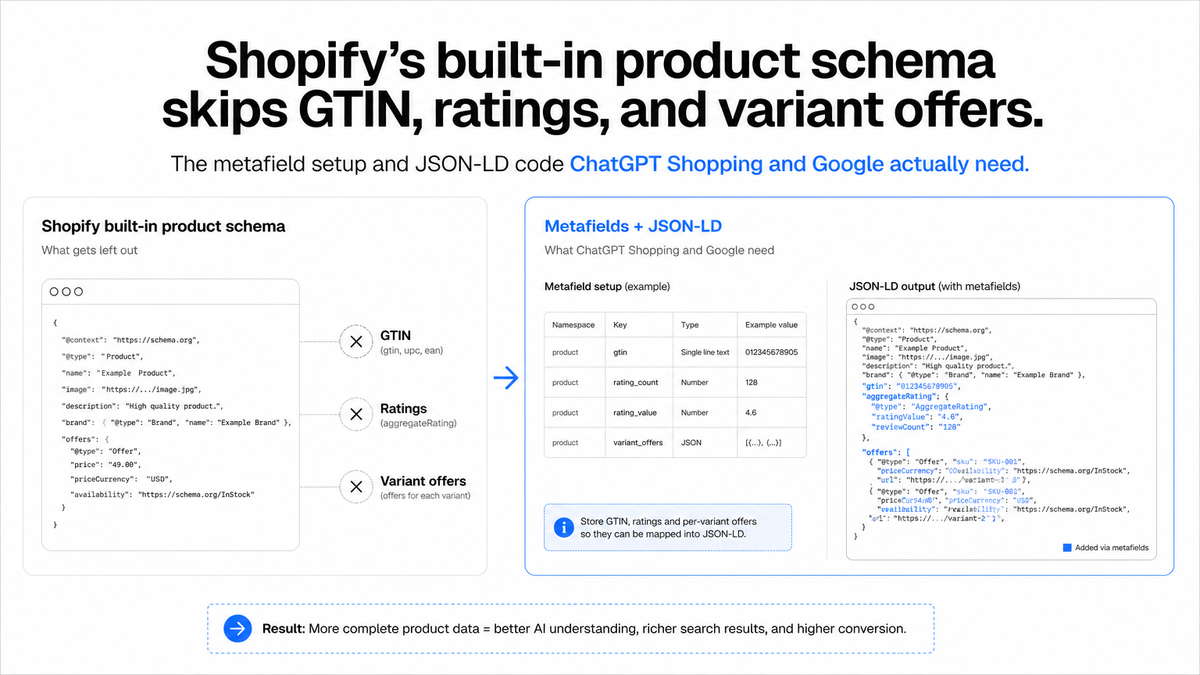
Shopify's theme-level structured_data filter outputs basic Product JSON-LD: name, description, image, brand, and one Offer. It skips sku, gtin, mpn, aggregateRating, and priceValidUntil, the exact fields ChatGPT Shopping and Google Merchant Center match products on. Closing the gap takes a handful of product metafields and a short Liquid edit, not a new app.
Key TakeawaysShopify'sstructured_dataLiquid filter outputsProductorProductGroupJSON-LD with name, description, image, brand, and a basicoffersblock, but it documents no output forsku,gtin,mpn,aggregateRating,priceValidUntil, oritemCondition(shopify.dev, 2026).Yourbarcodefield already holds the GTIN. It just needs mapping togtin8,gtin12,gtin13, orgtin14by digit length, since schema.org treats those as separate properties (schema.org, 2026).A missing or incorrect GTIN "may have limited visibility," and Google recommends against submitting one you're not certain is correct (Google Merchant Center Help, 2026).Shopify is actively replacing the singlebarcodefield with abarcodesconnection that holds up to 20 codes, as of the 2026-10 API version (shopify.dev changelog, 2026).OpenAI's commerce feed spec requires a GTIN or MPN as the purchasable-item identifier, alongside 9 baseline fields including price, availability, and brand (developers.openai.com, 2026).
A Shopify theme already prints product schema on every product page. It just leaves out the fields that decide whether ChatGPT Shopping or Google can actually use it. GTIN, ratings, and variant-level pricing details are absent from the default output, not broken, just never included.
This guide covers the exact metafields to create, the Liquid that wires them into your JSON-LD, and how to confirm it worked. It is the implementation layer underneath the Shopify feed eligibility checklist: that guide covers which fields your feed needs, this one covers how you wire a Shopify metafield into both the on-page schema and the feed that reads it.
In this article:
- What Shopify's Product Schema Already Covers (and Skips)
- Set Up the Metafields You'll Need, Once
- Map
barcodeto the Right GTIN Property - Add AggregateRating and Review Schema
- Wire the Metafields into JSON-LD and Validate
- One Metafield, Two Jobs: Feeding Both Schema and the Feed
- Troubleshooting Common Mistakes
- Frequently Asked Questions
- Same Metafields. Two Jobs.
What Shopify's Product Schema Already Covers (and Skips)
Shopify's {{ product | structured_data }} filter renders a Product entity (or ProductGroup when a product has variants, a change shipped July 16, 2024) with name, description, image, brand, url, and a basic offers object carrying price and priceCurrency (shopify.dev, 2026). That covers the core of what a page needs to be recognized as a product at all.
It does not document output for sku, gtin, mpn, aggregateRating, priceValidUntil, or itemCondition. Those six fields are exactly what separates a basic snippet from a record ChatGPT Shopping and Google Merchant Center can match, rank, and trust (schema.org, 2026). This isn't a bug Shopify needs to patch. The filter was built for a general storefront, not for agentic commerce feeds that cross-check identifiers across sources.
There's no separate "AI schema" to add on top of this. ChatGPT, Perplexity, and Google's AI surfaces all read the same Product and Offer vocabulary, just more completely than Shopify's default output provides. The platform-agnostic case for why there's no AI-specific product schema covers that strategic point for any storefront; this post stays Shopify-specific, covering the Liquid and the admin-UI mechanics that strategy guide doesn't name.
Set Up the Metafields You'll Need, Once
Create metafield definitions before touching theme code. A definition, not a bare metafield value, is what enables admin-UI validation and survives a theme switch, because the field stays attached to the product type rather than to one template's Liquid.
In Shopify Admin, go to Settings → Custom Data → Products and add a definition for each field your schema is missing. A namespace and key convention keeps these organized and migratable:
custom.mpn(single line text)custom.condition(single line text, or a list withNew,Used,Refurbished)custom.price_valid_until(date)
You do not need a metafield for everything. barcode already holds your GTIN natively, and vendor already holds your brand. Metafields are for the fields Shopify's product model has no native home for: MPN, condition, and a price-validity date.

Once a definition exists, every new product gets a labeled, validated field in its admin editor automatically. Going back and bulk-editing metafields across an existing catalog is still manual work, but at least it's work that sticks.
Map barcode to the Right GTIN Property
Shopify's native barcode field already holds your GTIN. The fix isn't new data entry, it's a conditional mapping: gtin8, gtin12, gtin13, and gtin14 are distinct schema.org properties, not interchangeable aliases for the same thing (schema.org, 2026).
variant.barcode sits on the Admin GraphQL API's ProductVariant object as a plain string field, separate from that variant's metafields connection, confirming it's a native field, not something you define yourself (shopify.dev, 2026). Map it by counting digits:
{%- assign barcode = product.selected_or_first_available_variant.barcode -%}
{%- assign barcode_length = barcode | size -%}
{%- if barcode_length == 8 -%}
  "gtin8": "{{ barcode }}",
{%- elsif barcode_length == 12 -%}
  "gtin12": "{{ barcode }}",
{%- elsif barcode_length == 13 -%}
  "gtin13": "{{ barcode }}",
{%- elsif barcode_length == 14 -%}
  "gtin14": "{{ barcode }}",
{%- endif -%}
An empty barcode produces a barcode_length of 0, so none of the branches fire and no GTIN property gets written at all. That's correct. An empty string is not a valid GTIN, and submitting one is worse than submitting nothing. Google is explicit here: "Only provide a GTIN if you're sure it's correct. When in doubt don't provide a GTIN" (Google Merchant Center Help, 2026). Missing or incorrect GTIN data "may have limited visibility," and a product with no identifier at all "may not be eligible for all Shopping programs or features" (same source).
A field is changing underneath you. As of the 2026-10 Admin API version, Shopify is replacing the singlebarcodefield with abarcodesconnection that holds up to 20 codes per variant, each with its own type (shopify.dev changelog, 2026).barcodestill reads and writes the first entry inbarcodesand has no announced removal date, so the Liquid above keeps working today. If you're building against the Admin GraphQL API directly rather than through theme Liquid, start pointing new code at thebarcodesconnection now.

Add AggregateRating and Review Schema
review schema only pays off when the reviews it describes are real, visible, and attributable. A valid AggregateRating needs ratingValue plus at least one of ratingCount or reviewCount, tied to an itemReviewed entity (Google Search Central, 2026):
"aggregateRating": {
  "@type": "AggregateRating",
  "ratingValue": "4.6",
  "reviewCount": "128"
}
Two rules matter more than the syntax. First, the content behind the markup "must be readily available to users from the marked-up page," immediately obvious, not hidden behind a tab a crawler never opens (Google Search Central, 2026). Second, Google's review-snippet guidance was updated with explicit language against fake or undisclosed incentivized reviews, now expecting a real reviewer name rather than promotional copy. Most generic review-schema advice predates this update and still treats any review text as fair game.
This is the one schema addition in this post with a direct Google rich-result payoff, distinct from the rest, which is about AI-engine readability rather than Google Shopping snippets specifically. Whether ratings actually move the needle on AI recommendation odds, not just Google's rich results, is covered separately in our review-signal analysis.
Wire the Metafields into JSON-LD and Validate
Extend your theme's existing JSON-LD block. Don't replace it. Add the metafield-sourced properties inside the same <script type="application/ld+json"> tag the structured_data filter already renders, or inside a manually built block in your product template:
{
  "@context": "https://schema.org/",
  "@type": "Product",
  "name": "{{ product.title | escape }}",
  "offers": {
    "@type": "Offer",
    "price": "{{ variant.price | money_without_currency }}",
    "priceCurrency": "{{ cart.currency.iso_code }}",
    "availability": "https://schema.org/InStock",
    "gtin13": "{{ variant.barcode }}",
    "mpn": "{{ product.metafields.custom.mpn.value }}",
    "itemCondition": "https://schema.org/NewCondition",
    "priceValidUntil": "{{ product.metafields.custom.price_valid_until.value }}"
  }
}
The illustrative GTIN line above assumes you've already branched on digit length as shown earlier; in production, only emit the one gtinN key that matches.
Keep the block server-rendered, not injected by JavaScript after the page loads. Google can render JavaScript. It still recommends placing Product structured data in the initial HTML (Search Engine Journal coverage of Google's guidance, 2026). Markup generated only after the page loads makes shopping crawls less reliable for fast-changing fields like price. Several AI crawlers never execute page JavaScript at all, so they never see client-side-only markup. That makes server rendering the safer default, regardless of what any one crawler supports today.
Before shipping, run the page through Google's Rich Results Test and the Schema Markup Validator, and check your site's raw server response with curl or view-source to confirm the JSON-LD actually appears there, not just in the rendered browser DOM.
One Metafield, Two Jobs: Feeding Both Schema and the Feed
Every metafield in this post can do double duty. The clearest case is identifier data. The same GTIN or MPN value fills a JSON-LD property for crawlers reading your page, and also feeds the ACP product feed ChatGPT Shopping ingests directly. OpenAI's spec accepts either one as the purchasable-item identifier, GTIN preferred and MPN as a fallback, alongside 9 baseline required fields: item ID, title, description, URL, brand, seller name, image URL, availability, and price (developers.openai.com, 2026).
| Metafield / field | Feeds JSON-LD property | Feeds OpenAI ACP feed |
|---|---|---|
barcode (native) |
gtin8 / gtin12 / gtin13 / gtin14 |
Yes, as the preferred identifier |
custom.mpn |
mpn |
Yes, when no GTIN exists |
custom.condition |
itemCondition |
Not in the current required or optional field list |
custom.price_valid_until |
priceValidUntil |
Not in the current required or optional field list |
| Reviews data | aggregateRating |
Not in the current required or optional field list |
That last column matters. Not every metafield feeds both channels equally. GTIN and MPN genuinely do double duty, filling an identifier slot in both your page's schema and the feed OpenAI reads. Condition, price-validity, and rating data enrich your on-page schema and Google's broader ecosystem, but they aren't part of the ACP feed's documented field list today. Treat the full mapping below as what to expect, not as a promise every field moves everything.
Troubleshooting Common Mistakes
| Mistake | Why it hurts | Fix |
|---|---|---|
| Submitting an empty string instead of omitting the GTIN property | schema.org and Google both treat an empty value as present-but-wrong, not absent | Let the Liquid conditional skip the property entirely when barcode_length is 0 |
| Guessing a GTIN for a variant with no barcode | A wrong or reused GTIN tells an engine two different products are the same, worse than no identifier | Fall back to mpn plus brand, never invent a GTIN |
| Shipping JSON-LD that only appears after JavaScript runs | A crawler that doesn't execute your scripts never sees the markup at all | Confirm the block appears in a raw curl fetch, not just the rendered DOM |
Reusing one product-level Offer for every variant |
A shopper's selected variant and the markup's price or availability silently disagree | Bind price, availability, and the identifier to the selected variant, not the parent product |
| Treating a passing validator as "done" | A validator confirms the markup parses, not that the record is competitive | Add brand, an identifier, and aggregateRating even after validation passes clean |
The most common failure mode I see in audits is the third one: a schema block that looks complete in the browser inspector and is simply never in the HTML a non-JavaScript crawler fetches. Checking the raw server response takes thirty seconds and catches more silent failures than any other single step in this list.
Frequently Asked Questions
Does Shopify add product schema automatically?
Yes. The theme's structured_data Liquid filter runs automatically, but it only outputs Product/ProductGroup with name, description, image, brand, and a basic offers block. It does not output GTIN, MPN, ratings, or priceValidUntil (shopify.dev, 2026).
Do I need a metafield for GTIN, or does Shopify already have one?
You don't need a metafield for GTIN. Shopify's native barcode field already holds it; the work is mapping that value to the correct gtin8/12/13/14 property by digit length, not creating a new field.
What's the difference between product schema and a product feed?
Schema is markup a crawler reads on the page itself. A feed is a file pushed directly to a platform like ChatGPT or Google Merchant Center on its own schedule. A well-built metafield can supply both from one source of truth, though not every metafield feeds both channels equally, as the mapping table above shows.
Does review schema help with AI search visibility?
It's one factor, and only when the underlying reviews are visible on the page and genuinely attributed to real buyers (Google Search Central, 2026). For the fuller signal-value question, see our full analysis of review signals.
Why isn't my GTIN showing up even though I filled in the barcode field?
Usually a digit-length mismatch, treating a 13-digit EAN as a gtin12, or a variant with an empty barcode being sent as if it had a real value. Count the digits before you branch, and let an empty barcode skip the property rather than fake one.
Same Metafields. Two Jobs.
Shopify's default schema is incomplete by design, not broken. GTIN, MPN, condition, and price validity close most of the gap, and the mapping work is a short Liquid edit, not a new app or a theme rebuild. Set up the metafield definitions once in Settings → Custom Data, map barcode to the right GTIN property by digit length, and keep the block server-rendered so every crawler, not just the ones that run JavaScript, can read it.
For the feed-side eligibility checks this schema work feeds into, including how making Shopify SKUs checkout-ready depends on the same accurate variant data, and what changed with ChatGPT Instant Checkout once a product clears this bar, see the rest of this guide's cluster.
If you want a faster read on where your own catalog stands, AEOsome runs a free feed and citation check. It flags which Shopify products are missing GTIN, ratings, or price-validity data today.
Vijaya Kumar Channalli is a serial SaaS founder and the founder of AEOsome (Tartu, Estonia), which helps eCommerce brands get their products recommended when shoppers ask AI what to buy. Read how we write, source and correct posts in our editorial policy.