How to Track ChatGPT Traffic to Your Shopify Store in GA4
Track ChatGPT referral traffic on Shopify with GA4's AI Assistant channel, a backup channel group, Shopify referrer reports and a Direct-traffic check.

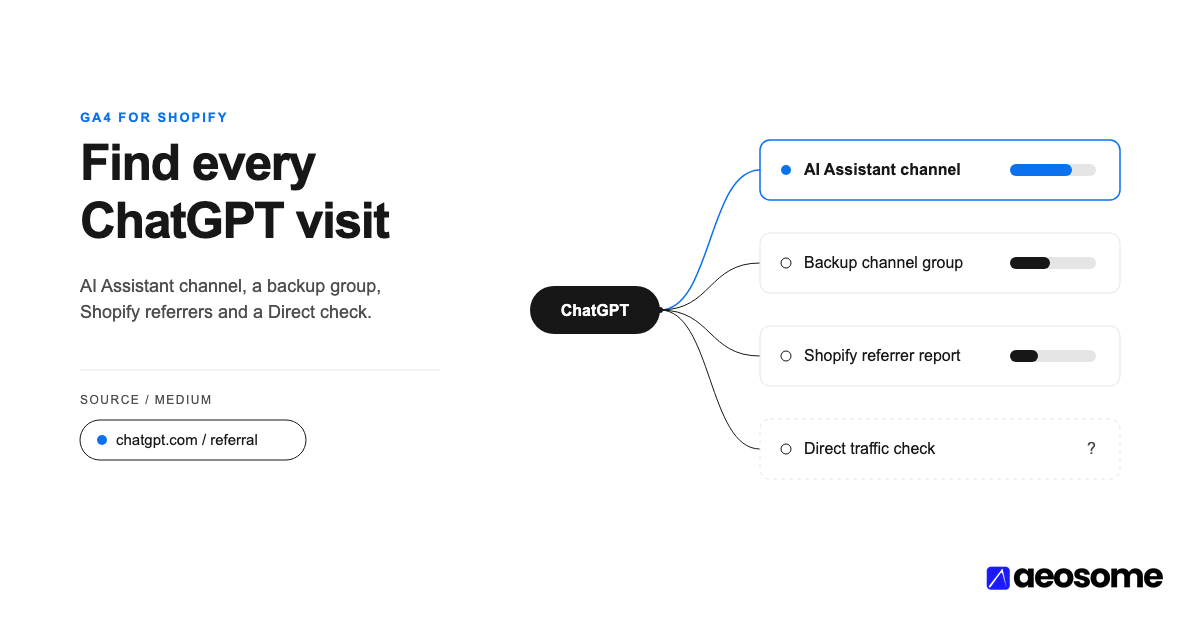
GA4 now sorts referred ChatGPT visits into its built-in AI Assistant channel, added on May 13, 2026. To track ChatGPT referral traffic on Shopify reliably, start with four things. Connect GA4 through Shopify's Google & YouTube app and read the AI Assistant channel. Then add a backup channel group matching chatgpt and cross-check Shopify's Sessions by referrer report.
Key TakeawaysGA4 added an AI Assistant channel on May 13, 2026. Its rule names ChatGPT, Gemini, Deepseek, Copilot and Grok, and leaves out Google AI Overviews and AI Mode (Google Analytics Help, 2026).From October 9 to 15, 2026, ChatGPT links opened with no referrer and no utm_source tag. On one analyst's pages, ChatGPT lost about 31,000 visits a day while Direct gained 26,000 (Search Engine Roundtable, 2026).AI-referred orders on Shopify grew nearly 13x year over year in Q1 2026 (Shopify, 2026).On product detail pages, AI-referred visitors convert at nearly 50% higher rates than organic search visitors (Shopify, 2026).The store hosting a product ChatGPT surfaces appears among that answer's cited sources for only 19.1% of Study 1's slots (AEOsome Research, 2026). A card click and a citation click are separate paths to your store.Your Shopify dashboard says ChatGPT sent you shoppers. GA4 says something else, or nothing at all.
Both can be right. A ChatGPT click can land in AI Assistant, Referral, Direct or Unassigned, depending on its tag, its referrer and your setup. A week-long bug in October 2026 showed how fragile that is. This guide gives you a six-step setup for one ChatGPT number you can trust in GA4, cross-checked in Shopify.
It is part of measuring AEO (Answer Engine Optimization): the work of getting your products recommended inside AI answers. If the term is new, start with what AEO means for an eCommerce store.
In this article:
- What You Need Before You Start
- How a ChatGPT Click Reaches GA4
- Step 1: Check the AI Assistant Channel in GA4
- Step 2: Build a Backup AI Channel Group
- Step 3: Read Landing Pages and Revenue, Not Just Sessions
- Step 4: Cross-Check in Shopify Analytics
- Step 5: Watch Direct Traffic for Hidden ChatGPT Clicks
- Step 6: Tag the Links You Control
- Troubleshooting ChatGPT Traffic in GA4
- Frequently Asked Questions
- One Number You Can Trust Beats Five You Can't
What You Need Before You Start
You need three things: GA4 receiving your Shopify data, Editor access to the GA4 property, and access to Shopify Analytics.
- GA4 connected once. Connect GA4 through Shopify's Google & YouTube app. A second, hard-coded GA4 tag in your theme double-counts page views and purchases.
- Editor role or above. Google requires Editor access at the property level to create or edit channel groups (Google Analytics Help, 2026).
- Shopify Reports access. You need permission to open Analytics and Reports in Shopify admin.
- A week of patience. Read ChatGPT traffic weekly. Daily numbers swing too much to act on (Step 5 explains why).
How a ChatGPT Click Reaches GA4
GA4 classifies a ChatGPT visit from two signals: the utm_source=chatgpt.com tag ChatGPT adds to its links, and the HTTP referrer. Lose both and the visit is Direct.
Google's default channel rules are specific (Google Analytics Help, 2026). AI Assistant means "the medium exactly matches 'ai-assistant'." GA4 sets that medium, with the campaign "(ai-assistant)," when the referrer matches its list of AI assistants. Referral means the medium is "referral," "app" or "link." Direct means the source is "(direct)" and the medium is "(none)" or "(not set)."
There are also two kinds of ChatGPT click. A product card click usually lands on a product page. A citation link often lands on a blog post, guide or collection page. Our AI Shopping Visibility Study found these rarely overlap. The host of a surfaced product appears among the answer's cited sources for only 19.1% of Study 1's slots. When it does, its median position is twelfth (AEOsome Research, 2026).
For the selection side, see how ChatGPT Shopping chooses products.
Step 1: Check the AI Assistant Channel in GA4
Open Reports, then Acquisition, then Traffic acquisition. Keep the primary dimension on the session's default channel group and find the "AI Assistant" row. Add Session source as a secondary dimension to isolate chatgpt.com.
Google announced the channel on May 13, 2026, for traffic from "chatbots like ChatGPT, Gemini, and Claude" (Google Analytics Help, 2026). The live rule page names ChatGPT, Gemini, Deepseek, Copilot and Grok as examples. Treat the exact list as Google's to change.
Know what the channel leaves out. Google AI Overviews and AI Mode count as Organic Search, not AI Assistant (Google Analytics Help, 2026). A shopper who finds you in AI Mode will never appear in this row.
Comparing against months before May 2026? Use Session source, not the channel. Source values like chatgpt.com mean the same thing in both periods, so the comparison stays fair.
GA4's AI Assistant channel, added May 13, 2026, covers chat assistants such as ChatGPT, Gemini and Copilot. It excludes Google AI Overviews and AI Mode, which GA4 counts as Organic Search (Google Analytics Help, 2026).
Step 2: Build a Backup AI Channel Group
Create a custom channel group as a safety net. ChatGPT sessions that arrive as Referral, or with only a UTM tag, then roll up into one line.
- Go to Admin, then Data display, then Channel groups.
- Click Create new channel group. GA4 starts you with a copy of the default group.
- Add a channel named "AI Assistants (all)."
- Set the condition: Session source matches regex, using the pattern below.
- Drag the new channel above Referral and Unassigned. Traffic joins the first channel whose rule it matches, so order decides the winner (Google Analytics Help, 2026).
- Save, then pick the new group as the primary dimension in Traffic acquisition.
.*(chatgpt|openai|perplexity|gemini\.google|copilot|claude).*
Each alternative catches one assistant's source value. chatgpt and openai cover ChatGPT. gemini\.google matches Gemini without catching every Google property. copilot, perplexity and claude cover the others. The leading and trailing .* let the pattern work whether the field needs a full match or a partial one.
Avoid broad patterns like .*ai.*. They also match "mail" and "retail," and your email traffic will quietly inflate the AI number.
Custom channel groups apply to your reports retroactively (Google Analytics Help, 2026). Standard properties allow two custom groups, so name this one clearly.
Step 3: Read Landing Pages and Revenue, Not Just Sessions
The useful ChatGPT number is revenue by landing page. It shows which products ChatGPT sends shoppers to, and which pages turn that visit into an order.
Build it in Explore with a Free form exploration:
- Rows: Landing page, then Session source.
- Values: Sessions, Key events and Purchase revenue.
- Filter: Session source contains
chatgpt.
Then split the rows by URL path. On Shopify, /products/ pages are where card clicks tend to land. /blogs/ and /pages/ URLs are where citation clicks tend to land. The split tells you which path is paying.
Shopify's own data explains why landing pages matter. More than half of AI-referred sessions start on a product detail page, against about 20% for organic search (Shopify, 2026). On those pages, AI-referred visitors convert at nearly 50% higher rates. Their orders carry 14% higher average order values (Shopify, 2026).
If a product page gets ChatGPT sessions but few orders, check its data first. Start with complete product schema on the pages ChatGPT sends shoppers to.
Citation clicks are the thinner slice for most stores. Only 10.3% of Study 1's 177,952 citations point to brand-owned sites (AEOsome Research, 2026). Editorial sites take 46.0%. Expect your /blogs/ rows to be small, and judge them on key events and revenue over a longer window, not sessions alone.
Only 10.3% of Study 1's 177,952 citations point to brand-owned sites. The store hosting a surfaced product appears among the cited sources for only 19.1% of slots (AEOsome Research, 2026).
Step 4: Cross-Check in Shopify Analytics
Shopify records its own referrer data, separately from GA4. Use it as a second opinion before you trust either number.
In Shopify admin, open Analytics, then Reports, then Sessions by referrer. The report shows whether visitors arrive directly, from search or by referral. Add Referrer site as a column to see chatgpt.com on its own (Shopify Help Center, 2026).
Orders matter more than sessions. Shopify says AI channel orders appear in admin "with channel or referrer attribution" (Shopify Help Center, 2026). That shows where each order came from.
For ChatGPT, the purchase still happens on your store. Shoppers pay "on your online store checkout in a ChatGPT in-app browser, or in a new tab" (Shopify Help Center, 2026). See how ChatGPT checkout changed for Shopify stores for the background, and the Agentic Commerce Protocol (ACP) for the checkout protocol behind agentic purchases.
Expect the two tools to disagree. Consent banners, ad blockers and different session rules all move GA4 away from Shopify. A steady gap is normal. A gap that suddenly widens is a tracking problem.
Step 5: Watch Direct Traffic for Hidden ChatGPT Clicks
When ChatGPT sessions fall, check whether Direct rose on the same landing pages before concluding anything.
October 2026 is the case study. From about October 9, ChatGPT opened links with a noreferrer setting, which strips the referrer. The utm_source=chatgpt.com tag disappeared too. An analyst studied about 500 pages where ChatGPT drove at least 5% of visits. ChatGPT traffic fell by 31,000 visits a day, and Direct rose by 26,000 a day on the same pages (Search Engine Roundtable, 2026).
On October 15, the same analyst reported the fix: "It was a bug. ChatGPT is tagging its links with utm_source=chatgpt(.)com again" (Search Engine Roundtable, 2026). Shoppers kept clicking. The measurement broke.
A ChatGPT tagging bug ran from October 9 to 15, 2026. On one analyst's pages, ChatGPT visits fell by 31,000 a day while Direct rose by 26,000 (Search Engine Roundtable, 2026).
Save a comparison you can open in a minute. Filter Direct sessions to deep product URLs, which few people type by hand. If those rise as ChatGPT falls, suspect tracking first.
Some daily noise may come from ChatGPT's side. In our AI Shopping Visibility Study, 60% of ChatGPT's answers came from gpt-5-3-mini, which showed a card 3.7% of the time. The full models showed one 65.3% (gpt-5-5) and 72.2% (gpt-5-3) of the time (AEOsome Research, 2026). That routing varied by collection day. We have not measured its effect on store traffic, so treat it as a possible cause. Read ChatGPT traffic weekly.
Step 6: Tag the Links You Control
You cannot add UTM tags to the links ChatGPT writes. You can tag the links you publish for AI surfaces yourself.
Use utm_source=chatgpt only for links that live inside ChatGPT, such as links in your own custom GPT:
?utm_source=chatgpt&utm_medium=ai-assistant&utm_campaign=your-gpt-name
The ai-assistant medium lets GA4's default AI Assistant rule pick these sessions up. Filter by utm_campaign to separate your custom-GPT links from ChatGPT's answer links.
Partner posts and other campaigns get their real source, such as utm_source=partner-name. Tagging them chatgpt would mix other clicks into your ChatGPT number.
Keep tags off canonical URLs and off the product URLs in your feed. Feed links should match the product pages ChatGPT already knows. Clean, untagged product URLs also support checkout-ready SKUs.
Troubleshooting ChatGPT Traffic in GA4
Most problems trace back to a missing medium, a missing referrer or a broken install.
| Symptom | Likely cause | Fix |
|---|---|---|
chatgpt.com / (not set) or ChatGPT in Unassigned |
A source tag arrived without a medium | Backup channel group by source (Step 2) |
| No AI Assistant row at all | No sessions matched the referrer list in the date range | Check Session source for chatgpt.com in Referral |
| GA4 far below Shopify | Consent mode, ad blockers, or a missing or duplicate tag | Reconnect GA4 through the Google & YouTube app |
| Sudden ChatGPT drop, Direct up on the same pages | Tag or referrer change on ChatGPT's side | Run the Step 5 comparison |
| AI number includes email or retail sites | Regex too broad | Replace .*ai.* with named sources |
Frequently Asked Questions
Why does ChatGPT traffic show up as Direct in GA4?
GA4 counts a visit as Direct when it has no tag and no referrer. That happened to many ChatGPT clicks from October 9 to 15, 2026, when ChatGPT links lost both signals (Search Engine Roundtable, 2026). Check whether Direct rose on the same product pages.
Does GA4 track ChatGPT traffic automatically now?
Yes, since May 13, 2026, through the AI Assistant channel in the Default Channel Group (Google Analytics Help, 2026). For ChatGPT's own links, it depends on the referrer arriving. A backup channel group catches sessions the default rule misses.
Can I add my own UTM tags to ChatGPT links to my Shopify store?
Not to the links ChatGPT writes in its answers. You can tag links you place inside ChatGPT yourself, such as links in your own custom GPT. Give partner links their real source, and keep tags off your product feed URLs.
Why don't GA4 and Shopify Analytics show the same number of ChatGPT visits?
They track differently. Consent banners and ad blockers can stop GA4 from loading, and the two tools define sessions differently. Watch the trend in each, and investigate only when the gap changes suddenly.
Does GA4 see orders placed through ChatGPT checkout?
Shopify documents where the purchase happens, not what GA4 records. ChatGPT shoppers finish on your own online store checkout, in an in-app browser or a new tab (Shopify Help Center, 2026). Shopify shows those orders with channel or referrer attribution in admin, so treat that as the record.
One Number You Can Trust Beats Five You Can't
GA4 has sorted ChatGPT visits automatically since May 13, 2026. AI-referred orders on Shopify grew nearly 13x in a year (Shopify, 2026). And the store hosting a surfaced product was cited for only 19.1% of Study 1's slots (AEOsome Research, 2026). Build the backup group, read landing pages, and check Direct before you panic.
GA4 measures clicks after ChatGPT shows your products. Whether it shows them at all is a separate question: see how often ChatGPT shows products at all. To check your catalog, run a diagnostic for products missing from AI shopping results, or read the complete guide to AEO for eCommerce.
If you want to know whether ChatGPT recommends your products or a reseller's, request a free AI shopping citation check from AEOsome.
Retrieval note: the Google Analytics Help and Shopify Help Center pages cited above are live documents. They were retrieved on October 29, 2026, and may change.
Vijaya Kumar Channalli is a serial SaaS founder and the founder of AEOsome (Tartu, Estonia), which helps eCommerce brands get their products recommended when shoppers ask AI what to buy. Read how we write, source and correct posts in our editorial policy.